No further information available.



Home » Product Range » Infrared thermography, thermography » Thermography software » Thermal imaging analysis software » Guide Sensmart ThermoTools software
thermal image display projection onto a photograph temperature evaluation report generation
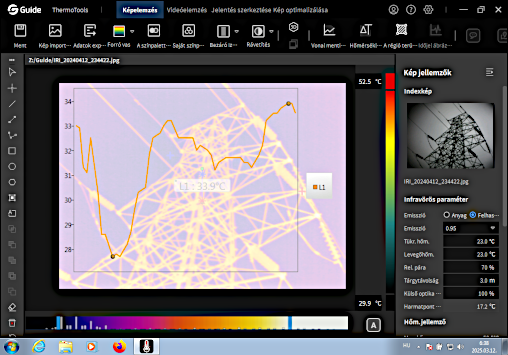
ThermoTools Thermal Imaging Software - Basic Program Functions
The Guide Sensmart ThermoTools thermal imaging software is a versatile, 64-bit program that runs on MS Windows® Win7/Win10/Win11 (and newer) versions, serving as a thermal image viewer and analyzer. The software is an accessory to Guide Sensmart thermal cameras. It is capable of reading and managing thermal images stored by the thermal cameras, while allowing for various types of image analysis. The software features a user-friendly, multilingual, ergonomically designed interface that can be operated in the language selected by the user.
Display Functions
The ThermoTools display and thermal image analysis functions cover the needs of most thermography applications, providing easy-to-use, multilingual (including Hungarian) user interface with numerous predefined color palettes for thermal image display, freely selectable or automatic temperature scaling, as well as various image processing capabilities: zoom, rotation, etc. digital filtering of thermal images; simultaneous display of thermal images, visual images, and composite (visual + thermal image).
|
Measurement and Analysis Functions The Guide ThermoTools thermal imaging software's image analysis function covers the requirements of most thermography applications: manual or automatic (post) temperature range selection selection of temperature physical unit (°C or °F) full surface, partial area, or pointwise emissivity correction determination of environmental temperature and transmission correction determination of emissivity factor based on the thermal image depiction of horizontal and vertical temperature profiles representation of various evaluation objects (line, square, ellipse, polygon) automatic display of thermal image or the min/max points of the measuring surface display of temperature curves along freely positionable lines Additional capability with connected thermal camera: remote control and interrogation of the thermal camera via USB interface. |
Export and Report Generation Functions
The ThermoTools thermal imaging software includes a report generator that allows for quick and convenient preparation and printing of thermal image analyses and reports. With Guide ThermoTools software, the sophisticated reports of performed thermography measurements can be quickly and conveniently generated: export of thermal images to bmp, jpg formats or xls, txt export of temperature curves to *.bmp, *.jpg formats built-in report generator program module (MS Office®-based) with visible image insertion and prepared comment fields direct printing with installed printers under Windows®.
No further information available.
Copyright © PIM Professzionális Ipari Méréstechnika Kft.
2026 | Minden jog fenntartva
Impresszum | Adatkezelés
Home » Product Range » Infrared thermography, thermography » Thermography software » Thermal imaging analysis software » Guide Sensmart ThermoTools software